TiriVelo, Inc.
From Passive Reporting to Actionable Admin Workflows


Overview
TiriVelo, Inc. is a Canadian startup that offers a marketplace platform for pet services such as dog walking, grooming, pet sitting, and more. My team was assigned the admin dashboard workflows and inherited an existing set of designs from the previous team.
Our goal was to build on the existing foundation and refine the experience so the dashboard could better support the day-to-day work of TiriVelo admins.
The Problem
The previous team had designed the overall structure and layout of the admin dashboard, but one important issue still needed to be solved: the dashboard functioned more like a reporting interface than an action-oriented tool.
Instead of simply displaying information, the dashboard needed to help admins quickly understand what required their attention and guide them toward the next step. The main challenge was turning the dashboard into a clearer starting point for resolving operational issues.
Discovery
Before jumping into design, we reviewed the existing dashboard structure and the handoff from the previous team to understand what had already been established and where the experience still felt incomplete.
While the layout provided a strong foundation, the dashboard still functioned more like a passive reporting tool than an action-oriented workspace. Key admin information was visible, but the interface did not yet clearly guide admins toward the actions they would need to take next.
Through this review, we identified the core design challenge: how might we turn the dashboard from a place where admins simply view information into a workspace where they can quickly identify, prioritize, and resolve important tasks?
My Role
Working alongside three other UX designers, I was responsible for refining two key flows: the Dashboard to User Management flow and the Dashboard to Support Inbox flow.
Both flows already had an initial structure in place, but my role was to make them more actionable, admin-centered, and easier to navigate. I focused on clarifying priority information, improving the hierarchy of key actions, and creating smoother paths from identifying an issue to resolving it.
The Dashboard to User Management Flow
The admin dashboard serves as the central overview of daily activity across TiriVelo’s platform. It surfaces important issues related to payments, provider verification, customer service, and other operational needs.
Because the dashboard also functions as the product’s homepage, nearly every workflow begins from this screen. That made it especially important for the dashboard to highlight the most urgent issues clearly and help admins understand where to take action first.

Admin Dashboard - Before
I started by reviewing the existing dashboard content to identify which information supported admin decision-making and which areas created unnecessary noise. After aligning with the CEO, I learned that the calendar and task list were not necessary inside the dashboard because admins already relied on Slack and other project management tools for those needs. Removing these sections helped reduce duplicated information and created more space for the actions that were most relevant inside the product.
From there, I worked with the CEO to clarify which admin tasks were most urgent from a business and operational standpoint. Together, we identified three priority areas that represented real admin action:
Pending provider verifications
Failed payments
Open or unresolved tickets
Rather than treating these as simple dashboard stats, I used them as action entry points. I moved them into cards at the top of the dashboard and added clear CTAs so admins could quickly move from identifying an issue to taking the next step.
This helped shift the dashboard from a passive summary into a more useful starting point for daily admin work.
Admin Dashboard - After
After improving the dashboard’s main action areas, I focused on one of the workflows admins would enter from the dashboard: resolving support issues through the Support Inbox.
Support Inbox Flow
The Support Inbox allows providers and owners to communicate directly with TiriVelo admins. The experience functions like a familiar messaging system, allowing admins to respond to disputes, account issues, and service-related concerns.
Because many of these conversations are tied to specific users, tickets, or account details, admins needed a way to reference important information without losing context while messaging.

Support Inbox - Before
In the original design, the CTAs for viewing Owner, Provider, and Ticket information were easier to miss within the message thread. Since these details are often needed while resolving support issues, I moved the CTAs to the bottom of the interface so they stayed visible and accessible.
This made the support flow feel more actionable because admins could continue the conversation while still having a clear path to the information they needed.

Support Inbox - After
I also noticed that the existing Owner and Provider overlays could be clearer. While the information was useful, the hierarchy made it harder to quickly understand what details were being shown.
I redesigned the overlays to reduce visual clutter, improve scanability, and make key account information easier for admins to review at a glance.
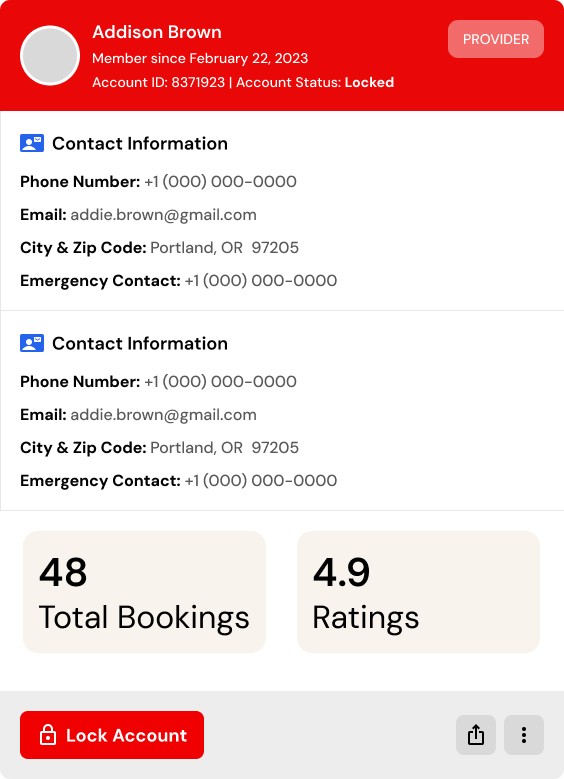
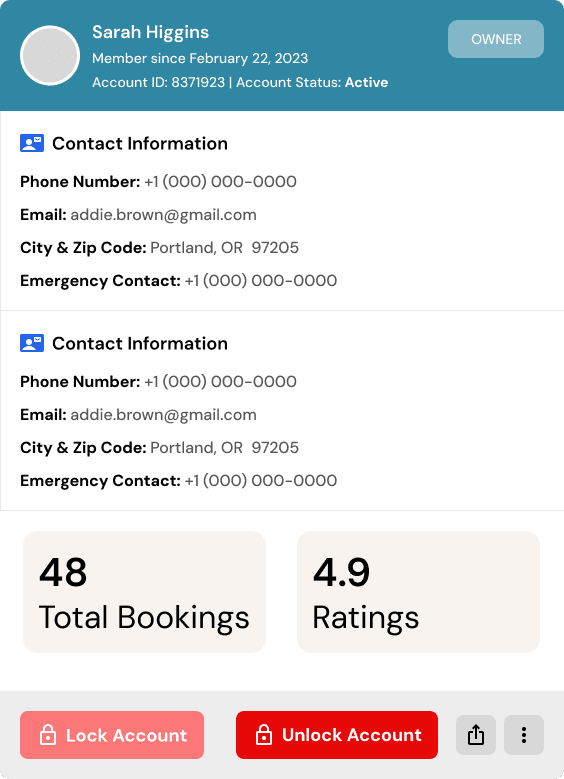

Support Inbox Flow Overlays
Identifying a Missing Flow
Once I had redesigned the Support Inbox screens and overlays, I identified one important flow that did not yet exist: the ability to unlock an account.
The existing flow accounted for locking an Owner or Provider account, but it did not fully address what would happen if an admin needed to reverse that decision. Without an unlock path, the experience felt incomplete and less realistic for day-to-day admin use.
To keep the experience consistent, I mirrored the existing account-locking pattern and applied it to the unlock flow. Admins could complete the action from the Owner or Provider overlay and receive a confirmation toast once the account was successfully locked or unlocked.
This created a more predictable interaction pattern, gave admins clearer feedback, and made the workflow feel more flexible for real operational scenarios.
Support Inbox Flow Overlays
What I Learned
This project taught me how important it is to understand the difference between information and action, especially when designing internal tools. A dashboard can show a lot of useful data, but if it does not help users understand what to do next, it can still slow down the workflow.
I also learned how to use stakeholder conversations as a starting point, not the final answer. The CEO helped clarify which admin tasks mattered most to the business, but my role was to translate those priorities into clearer workflows, stronger hierarchy, and more usable interaction patterns.
Most importantly, this project helped me think more critically about edge cases. Identifying the missing unlock flow showed me that strong UX is not only about improving what already exists — it is also about noticing what is missing and designing for the real situations users may encounter.